






 Microsoft Copilot


Microsoft Dataverse for Teams is a built-in, low-code data platform that gives a Teams team its own Dataverse environment for tables, Power Apps and Power Automate flows. Microsoft has deprecated it. New environments cannot be created from 15 November 2026, and environments not upgraded to Dataverse are suspended on 15 September 2027 and decommissioned on 30 October 2027.
Rencore Governance gives you one inventory of the apps, flows and owners across your Power Platform environments, including those tied to Teams, so you can decide what to upgrade and what to retire.
Microsoft has deprecated Dataverse for Teams; the timeline is on Microsoft Learn under Deprecation of Microsoft Dataverse for Teams environments. This 2023 post describes the product as it was introduced.
In my last blog, Microsoft Teams as a (Power) Platform, I covered the lowest level of integrating Power Platform tools into Microsoft Teams. Now we are doubling the Power by taking the integration options to the next level!
With Dataverse for Teams, we get the most important Dataverse features included within the context of our Microsoft Teams team without the need for additional licensing. When using Dataverse for Teams we are actually getting a Dataverse environment linked to the Office Group of our Microsoft Teams team.
Within this Dataverse for Teams environment we can create Tables, Power Apps, Power Automate Flows and even Power Virtual Agents. Should you want to know more about the full Dataverse features versus the features of Dataverse for Teams please see Dataverse for Teams vs. Dataverse, Power Apps | Microsoft Docs. Even though there is some flexibility, the main concept is that you get all these Premium Power Platform goodies for all your team members.
The added value
A lot of the Microsoft 365 people starting with Power Platform, first discovered Power Platform tools by customizing SharePoint for their smaller business applications. The two first tools in sight being Power Apps for customizing list and library forms plus Power Automate for adding workflow automation to items in lists and libraries.
From this moment on, you as a Citizen Developer have probably discovered some limitations in using SharePoint, Microsoft Lists, or Microsoft Excel as a database. For example, some limitations on data types, text search, item number thresholds and data query features. For a basic comparison please see Comparing Microsoft Lists, Dataverse for Teams, and Dataverse, Power Apps | Microsoft Docs.
With Dataverse for Teams all Citizen Developers can take their Business Application building skills up a notch. And the best part is: no additional licensing!
Getting started
Because the Dataverse for Teams environment is linked to the Office Group of a Microsoft Teams team, we need to have a Microsoft Teams team created. With an already existing Microsoft Teams team, the first step is to open up the Power Apps App present in your Microsoft Teams Client:

From within the Power Apps App of Microsoft Teams, the Start now button will take you to a wizard guiding you to provision a Dataverse for Teams environment linked to your Microsoft Teams team:

For a step-by-step guide, please see Enable Power Apps and Dataverse for Teams in Microsoft Teams (contains video), Power Apps | Microsoft Docs.
Once you have taken these first steps, you can always return to existing Dataverse for Teams environments by using the Build tab of the Power Apps App in Microsoft Teams:

Tips:
- When starting out with Dataverse for Teams, I highly recommend to create a testing Team and install one of the sample apps to learn about the possibilities: Use sample apps from teams store, Power Apps | Microsoft Docs.
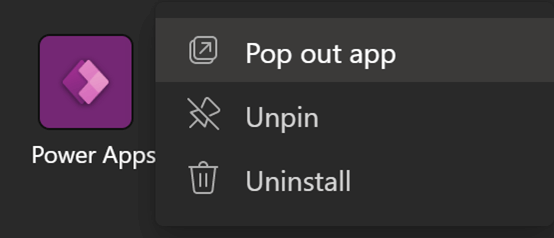
- If you are a heavy Microsoft Teams user and still want to use Microsoft Teams for meetings and chats while building, make use of the Microsoft Teams web application or use the new Pop out app feature opening a new window of your locally installed Microsoft Teams client:
If you are more familiar with the Power Apps Portal you can easily open up the Dataverse for Teams environment in a browser by using the Open in Power Apps feature:

Power Platform Governance
Although we rightly champion the successful adoption of Power Platform, IT self-service in general, lives outside of IT governance’s traditional reach and therefore needs special attention. Therefore, a specialized Power Platform governance strategy is required to provide visibility across apps and flows, simplify power user management, and enable IT operations teams to react fast. Without one, company data becomes vulnerable, administration and licensing permissions go unchecked, and monitoring the apps becomes an insurmountable task.
I highly recommend the following whitepaper: Microsoft Power Platform governance best practices. It gives you the fundamentals for governing the Power Platform as part of the wider Microsoft 365 ecosystem.
Last updated 12 November 2026


